
Your shopping cart is currently empty.
Setup Your Lightroom, or Find a Good Location
When taking product shots, do-it-yourself merchants have a couple of options when it comes to lighting conditions. You can use natural light or you can use a simple lightroom setup described below.
Using Natural Light
If you're using natural light, you'll want to pick a location with indirect natural light exposure. You can set up an indoor naturally-lit studio with a simple white backdrop next to a large window. This is helpful if you need to stage oversized items and don't have access to large photographic lightroom and equipment. You can also take photos outside, just pick a location in the shade where no shadows are cast by things like plants or large trees. Overcast days tend to work well if you're tyring to shoot in even, indirect light exposure conditions.

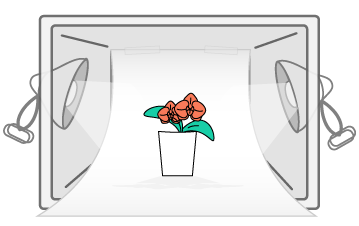
Clamp one light on either side of the plastic container. Tape the sheet of posterboard to the upper-back of the container, being careful not to cause any creases, wrinkles or blemishes in the poster board.
For a mirrored effect, place a thin, pliable piece of plexi glass over the posterboard. Place your product in the middle of the lightbox, and position so adequate light is showcasing your subject.
Create a Simple Lightroom for Under $50
- Clear plastic tote or container
- 1 Piece of white poster board
- 2 Clamp lights
- 2 5000K Daylight Flood Lights
- Scotch tape
- Optional: thin piece of plexi glass if you desire a 'mirrored' effect for product images.
There are a bunch of pre-fab micro product lightrooms for great prices. A simple search will turn up many different, affordable options!
Next, Position Your Camera on a Tripod
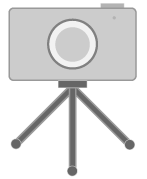
A simple point-and-shoot camera is all you'll need, and a small flexible tripod. If you don't have one, you'll need to improvise with some sort of base so your camera is stable.
Helpful tip: You may want to set up your mini-lightroom in a place with no other sources of light pollution, such as a basement or room without very many windows. This will give you greater consistency and control of the lighting conditions over time.
Adjust Camera Settings for Product Photography
ISO 100
1. Set your ISO to 100
ISO is the image sensitivity of the light sensor. A camera is a reflective light capture and translation device - the more reflective light it captures, the more detail it captures as well.
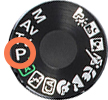
2. Set your camera to the 'P' Setting
The 'P' stands for Programmed Automatic. It sets your camera so it is somewhere between manual and automatic settings. It allows you to set the ISO, exposure and white balance. But it will do some of the more complicated adjusting when it comes to aperture and shutter speed. Set it, and forget it.

3. Zoom in a Smidge, But Not Too Much
This will force your point-and-shoot camera to auto-focus.

4. Most imporant: know how to set your camera self-timer!!!
By using a timer, you'll prevent any blurry photos from happening when depressing the shutter button. Set it to use the 2-second delay. 10 seconds is annoyingly slow when many product shots need to be taken in a day.
Ready, aim, shoot! With your camera set, take a few test photos and check to make sure you're getting the desired lighting and image quality.